Wednesday, July 3, 2013
Maybe I will try out Pion
A simple C++ framework accessed via localhost might be nice. Pretty barebones but there is a Pion example in the belly of their code.

Monday, July 1, 2013
A moment to poke fun at the GOOG
Hey we all love the GOOG right? I mean they have flawless execution, especially in their production environments. Ok, you probably know I am being a bit sarcastic.
Especially when we see that they can be as silly as the rest of us.
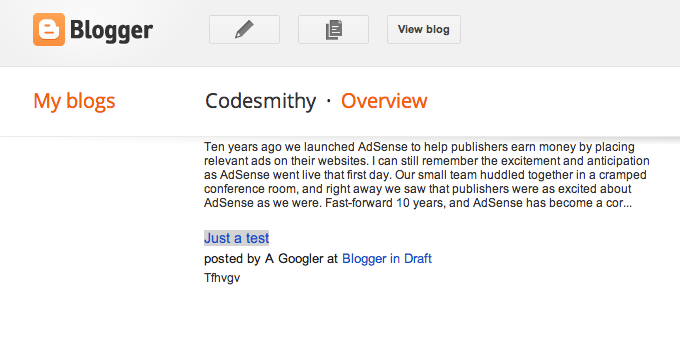
So I thought, maybe this was a recent little test a googler is running

2012-12, maybe they never got retraction for blogger announcements working! Whoops!
We live in an imperfect world. ♥ ya google! That isn't sarcasm.
revoltdc hackathon 20130622 [iteration 3 ] {Success}
Executive Summary
Attempted/Accomplished
- Decided to do an isolated http.call instead of the double dependent http.call and get it right first
- Identified a solution to using the router using autorun to avoid an infinite rendering loop
- Discovered a bug that I needed to resolve blocking my use of reactivity.
Lessons learned
- LESS files must be stored in the client directory to be served
- How to use a local collection
- A good use of autorun
- About a condition for infinite rendering
Questions and Todos
- Find a way to test the existence of an image on another server before setting an image location (perhaps by looking at a status code via an http.call)
- Better explore the relationship of the rendering chain when using Meteor.Router
The details
Changeset here. If you choose to review this changeset, don't get thrown off: there are the addition of a few images. Since SVG is stored as in an xml-ish format, you'll see a lot of not particularly meaningful changes. We are still on meteor 0.6.4, but now we are also using less. Less is one of a group of pre-compiler class CSS tools, so we can use less (no pun intended) CSS code to do more in a uniform manner. This helps enable us to use consistent CSS throughout our application at the cost of pre-compilation; but the beauty of having it as a meteorite package is that meteor will handle the pre-compilation for us automagically. In general, it is important to note that with coffeescript and less, if we are given errors once these scripts are deployed, traceback will also not line up directly with the numbering so you need to look at errors with a general understanding that this is the case. Finally remember if you check out the code that you'll need a sunlight api key of your own and that it goes in the root / Server.coffee file.
In this iteration I decided to take a little break from the multiple calls to sunlight on the server and just get a single call working right first. This call is for biographic information for a legislator.
So here is a case where we succeed, but it isn't really all that clear what the dependencies are. Therefore we will have to remove all possible dependencies to determine the truth or do further research.
Somewhere along the way I discovered that during rendering a "party" variable was undefined, and javascript interpretation for the function was halted on this error. We had a bug lingering in the code, and this bug revealed a few things to me:
- I need to think more "lisp"y or (in other words) recursively: as reactive changes occur, templates get rerendered, so we need to be extra careful about the initial states of variables in these templates.
- We can't guarantee there will be any initial population of the variables we are using, and if javascript on the client breaks, we lose our updates
- The reactivity of a local cursors works fine with set and get Session variables on the client.
So here is what success looks like

Now the post here works, but its still very much a hack job. We pull the image using the govtrack id from the govtrack project to display it here, but when it isn't available we get a broken image. We have some code to post parties, but I don't know all of the codes sunlight uses. What happens when we get something more obscure for the party, like the justice party? So these links should be tested and need a default for not being able to fetch an image. In short there is obviously a lot to fix, but it is nice to see things working to some degree
Of note in the image, party rendering is called a few times, and we can see the fetched row from our cursor pointing to mini-mongo. Please note there is a distinction here - mini-mongo is created on the client only! Take a moment to examine the hints from the documentation or just trust the following statement
"The name of the collection. If null, creates an unmanaged (unsynchronized) local collection."
So let's look at how this is accomplished
Here is the file at this point in it's history. Time to tear it up for my edification (and possibly your own):
#somewhere close to the beginning in Client.coffee under the root/client subdirectory
#Establish a null local collection, ooh la la
localbiocollection = new Meteor.Collection(null)


#let's observe, for the lulz, the collection as items are added
localbiocollection.find().observe(
        added: (doc,beforeIndex)->
            console.log(Session)
            console.log(doc)
)
So at this point we have declared a collection available to the client. This creates an empty mini-mongo db client side we can store to. I have a lot of questions about this: is this basically html5 only? What is the compatibility of mini-mongo? I guess time will tell. I am testing in a fairly modern version of Chrome.
Ok, now that we accepted this magic on faith, let's look at a bug that consumed me for a while. I didn't investigate the error thrown by an undefined "bio" in the variables below, but that threw me off for a while. Our helpers are called during rendering and let us populate corresponding handlebar template variables (with what we return)
#somewhere in Client.coffee under the root/client subdirectory
Template.bio.helpers
        result: ->
            console.log("party rendering")
            #at this point we want the only record in this collection and we want it now, so we call fetch
            bio = localbiocollection.find().fetch()[0]
            console.log(bio)
            return bio
        party:->
            console.log("party rendering")
            #at this point we want the only record in this collection and we want it now, so we call fetch
            bio = localbiocollection.find().fetch()[0]
            #before this "if", everything was broken!!!!!
            #I could not coun't on my biocollection being populated before rendering
            if bio
                party = bio.party
                img_url = "/img/parties/"
                if party == 'R'
                    img_url +="republican.svg"
                else if party == 'D'
                    img_url +="democratic.svg"
            else
                img_url = "/img/hamsterload.gif"
            return img_url
That if statement is very important. If we try to do things we shouldn't with a variable and it throws an error, the interpretation halts and our code doesn't update things properly. Javascript can be very forgiving and just as unforgiving.
Let's take a quick look at the template and bio.less files.
{{#if result}}
 {{else}}
 {{/if}}
{{#if result.chamber equals "senate"}}Senator{{else}}Delegate{{/if}}
{{result.first_name}} {{result.middle_name}} {{result.last_name}} ({{result.party}})
Bioguide: {{result.bioguide_id}}
Birthday: {{result.birthday}}
Conact:

Let's take a moment to look at less. Based on the syntax highlighting can you guess the code that is "less" specific? Hint: this is css highlighting. Note that despite your training, even though a LESS file is css, probably because of the pre-processing involved LESS files are not to be stored in the public directory. bio.less is in the root client directory!
/*Located in the CLIENT directory */
.rounded-corners (@radius: 5px) {
  -webkit-border-radius: @radius;
  -moz-border-radius: @radius;
  -ms-border-radius: @radius;
  -o-border-radius: @radius;
  border-radius: @radius;
}

#bio_img {
  position: fixed;
  left: 0;
  top: 20em;
  width: 20em;
  margin-top: -2.5em;
  .rounded-corners (25px)
}

#bio_party_img{
  position: fixed;
  left: 125em;
  top: 20em;
  width: 20em;
  height: 20em;
  margin-top: -2.5em;
  .rounded-corners (25px)
}

body{
 font-family: "Book Antiqua",Georgia,"MS Sans Serif", Geneva, sans-serif;
 background: #A3181E url(/img/bg_body.gif) fixed repeat-x;
 margin: 0;
 margin: 0;
 padding: 0;
 height: 100%;
}

div.header_capitol{
    height: 149px;
    background: url(/img/Capitol_unselected.png) fixed no-repeat;
}

div.header_capitol_selected{
    height: 149px;
    background: url(/img/Capitol_Selected.png) fixed no-repeat;
}

div.content{
    position: relative;
    margin-left: 21em;
    margin-top: 7.5em;
    height: 100em;
    width: 100em;
    background: #eee;
    font: 18px;
    .rounded-corners (10px)
}
So now you've more or less seen the css behind this. If you answered "rounded-corners" by the way, give yourself a cigar (or your personal preferential substitute). Other than reusing that code, it more or less looks just like css, huh? Moving on.
An issue to consider is rendering, particularly with the Meteor router add on package. If we create dependencies in the router, it more or less seems to become part of the rendering process. Inferring this might be the case, I had to decide a way to excise rendering dependencies from the router code. So here, if we set something reactive and create dependencies inside our helpers or rendering, we can end up in an infinite loop - if it even works. Instead, we rely at this juncture on autorun. We'll show you how to do that now:
Meteor.Router.add
     #.....snip out code .......
    '/bio/:query': (query) ->
            Session.set("bioquery",query)
            #Session.set("biographic",bio)
            Session.set("federal",true)
            #console.log(bio)
            #externalcall_dep.changed()
            return "bio"
You can easily tell I've been experimenting looking at the comments in this code. In any event, here I set a bioquery, and I will be monitoring this with an autorun. If I elected to run the meteor method which in turn calls out to the Sunlight api, I can end up in an infinite loop right; assuming I am correct about dependencies rerendering - because the call comes later, so when the results return just milleseconds later, the router gets triggered, we get rerendering but the same meteor method would get called in the process and we would get the same data fetched and asynchronously injected again. Bad news. Instead of letting this happen, we have an autorun block monitor for changes in what we want to query and insert this in the aforementioned local collection. This enables us to take the calls out of the rendering process and set a reactive source (the localbiocollection cursor) to a value to update rendering.
Meteor.autorun ->
    bioquery = Session.get("bioquery")
    if bioquery
        bioquery_result = Meteor.call("fetchBiographic", bioquery,
                                (err,res) ->
                                    localbiocollection.insert(res)
                            )
Now we get the dependencies updated properly. Fantastisch!!
Wednesday, June 26, 2013
revoltdc hackathon 20130622 [iteration 2] {Fail}
Still talking meteor 0.6.4 here, changeset here
Reviewing the docs I noted that during deployment you need to deal sometimes with fibers which I have seen referenced to futures. So I decided to see what I could glean from finding it.
ls .meteor/local/build/server/node_modules/fibers/
Then not having noticed anything jump out at me immedeately, searched and found some references
Sources
- http://stackoverflow.com/questions/12569712/meteor-calling-an-asynchronous-function-inside-a-meteor-method-and-returning-th
- https://github.com/semateos/meteor-async-test
Added this, which fails
Meteor.startup ->
    require = __meteor_bootstrap__.require
    Future = require('future');
    return
As you can see
[26/5/2013][13:49:1.805][SERVER][Observatory][VERBOSE][] Creating logger with level DEBUG, print to console: true, log user: true
TypeError: undefined is not a function
    at app/server/Server.coffee.js:7:19
    at run (/revoltdc_hackathon_20130622_continued/.meteor/local/build/server/server.js:329:63)
    at Array.forEach (native)
    at Function._.each._.forEach (/.meteorite/meteors/meteor/meteor/9bb2b5447e845c4f483df5e9b42a2c1de5ab909b/dev_bundle/lib/node_modules/underscore/underscore.js:78:11)
    at run (/revoltdc_hackathon_20130622_continued/.meteor/local/build/server/server.js:329:7)
Removed
Meteor.startup ->
    require = __meteor_bootstrap__.require
    Future = require('future');
    return
Result:
Server doesn’t crash
Searched more: meteor futures fiber
Source
In the code below, I attempt at first to use just a single future object, but the server complained. I believe there is a way to do this, but this isn’t it. Anyhow, I added two futures. The result is the same; perhaps setting the session in the router is the real issue.
checkCapitolWords: (query) ->
        Future = Npm.require("fibers/future");
        fut = new Future()
        fut2 = new Future()
        result = Meteor.http.call('GET',"http://congress.api.sunlightfoundation.com/legislators",
            params:
                "apikey": sunlight_api_key,
                "last_name": query,
            ,(err,res)->
                    return fut.ret(res)
        )
        result = fut.wait()
        console.log( query + " is query")
        if result.statusCode is 200
           resulting = JSON.parse(result.content);
           console.log( resulting.results[0].bioguide_id )
           bioguide_id = resulting.results[0].bioguide_id
           capitol_by_leg = Meteor.http.call('GET',"http://capitolwords.org/api/1/phrases.json"
                params:
                    "apikey": sunlight_api_key,
                    "entity_type": "legislator",
                    "entity_value": bioguide_id
                (err,res)->
                    return fut2.ret(res)
           )
           capitol_by_leg = fut2.wait()
           if capitol_by_leg.statusCode is 200
              resulting = JSON.parse(capitol_by_leg.content);
              resulting.sort (a, b)->
                return b.count - a.count
              console.log(resulting)
              return resulting
            else
              return resulting
        false
So let’s review what I learned from failure.
- There exists a meteor bootstrap function I can use to require stuff
- I can use a future to guarantee waiting on a callback
- Most people suggest using a collection to update, which in turn will behave reactively, the session may be a poor choice here
- The regular future object can’t be reused
- The location of fibers in the local hidden directory
- Is there a way to use one meteor method to call another?
- If so, will my this work differently?
- We should verify using a collection to update will in turn will behave reactively
Tuesday, June 25, 2013
revoltdc hackathon 20130622 [iteration 1 a] clues
You should never ever block your developers from IRC, if you do, you don't understand development well enough
[19:38] <memomemo> I'd like to know the proper way to call meteor.apply
[19:39] <memomemo> my project is completely public
[19:39] <memomemo> https://github.com/meyilmaz/revoltdc_hackathon20130622_continued
[19:39] == someone [~] has left #meteor []
[19:39] <a person> it's the same as meteor.call except the arguments are given as an array
[19:39] <memomemo> well in my project
[19:40] <memomemo> I am trying to hit the sunlight api in two subsequent calls from the meteor server in a meteor method
[19:40] <memomemo> the second call is dependent on the first
[19:40] <a person> ok
[19:40] <memomemo> this is an http.call
[19:40] <a person> you want fibers probably
[19:40] <a person>> memomemo:  https://gist.github.com/possibilities/3443021
[19:41] <memomemo> ok, but are you aware I am looking to run them one following the other? I need data from the first call?
[19:41] <a person> did you look at that url
[19:41] <a person> it explains how to do that
[19:42] <memomemo> awesome thanks so much
Unfortunately this doesn't help, even though it is good info. Turns out futures was basically cut, but perhaps this is a good point to review fibers in eventedmind
RevoltDC Hackathon 20130622 [Iteration 1] {Fail}
Two notes here
- Removing unblock doesn't solve the problem
- Using meteor apply isn't obvious enough on how to get the function working with options
Maybe I'll check freenode
Get a picture if you are following along the changeset is here
Server prints data fine and executes fine, doing to calls to the sunlight api (call is shortened)
Gardner is query
G000562
[ { tfidf: 0.00161716760949, count: 72, ngram: 'colorado' },
  { tfidf: 0.000431216731236, count: 58, ngram: 'energy' },
  { tfidf: 0.000168406409022, count: 55, ngram: 'jobs' },
  { tfidf: 0.000279620851672, count: 32, ngram: 'debt' },
  { tfidf: 0.000443389920289, count: 27, ngram: 'oil' },
  { tfidf: 0.000590425270757, count: 19, ngram: 'they\'re' },
  { tfidf: 0.000197000043001, count: 16, ngram: 'regulations' },
  { tfidf: 0.000158407422796, count: 14, ngram: 'creation' },
  { tfidf: 0.000745681911791, count: 14, ngram: 'permitting' },
  { tfidf: 0.000182821819519, count: 13, ngram: 'i\'m' },
 ]

Monday, June 24, 2013
RevoltDC Hackathon 20130622
Tools I tried for this hackathon [http://www.revoltdc.com/]
Saturday, June 22, 2013 from 8:00 AM to 7:00 PM (EDT)
Washington, DC
- https://github.com/zenkay/d3-cloud-simplified
- Meteor JS, packages D3,jquery, jquery-ui
There are two parts to this, one part coding, the other part story.
The coding
Well to update things, I wasn't able to actually able to add it to the repo for the hackathon so up with the buzzer code here
There are a few components here I'll go over briefly. The first is meteor router.
Meteor Router
View the how the router worked at the time by clicking here and reviewing the example js fileNow if you've been following local trends, routing is sort of being handled on client and server. In meteor, sometimes client code is treated more or less as a stub. However, routing seems like it can be mostly superfiscial; the server may only need to know when it needs to run code that processes variables or needs to call methods - or so it seems. Given that atmosphere (meteorite) packages don't have tons of documentation at this time we have to infer a lot. I am still busy inferring and may have to do some code diving on this one. Eventedmind has a simplepages version they go over, and that version is well explained in the video.
Why the router? Well it affords me the opportunity to try different things on different URLs
So now let's go through what I did with the router.
Meteor.Router.add
    '/test':'somedata',
    '/nice/:query': (query)->
            Meteor.call("checkSunlight",query,
                (err,res)->
                    Session.set("result",res)
            )
            return "nice"
    '/capitol/:query': (query)->
            Meteor.call("checkCapitolWords", query,
                (err,res)->
                    console.log("test")
                    Session.set("result",res)
            )
            return "capitol"
To quickly explain, the code above is located under the Client/Client.coffee file. This means that it is only served to the client.
The first section may be self explanatory, but each '/<blah>' is what is parsed from the url and that in turn gets routed through a javascript function - which, on return will render the template of the string returned. I believe the function may also allow a call to a Meteor.<mytemplate>.render function directly, but I'd have to test that. The latter portion is the function or string used to identify the template to render. it is inside here that I use Meteor.call to call specially crafted asynchronous calls to the server [which in turn fire asynchronous calls to Sunlight]
Our routable template
We have our templates defined below
revoltdc_hackthon20130622 - {{title}} {{renderPage}}Hello World!
{{greeting}} test{{#each result.results}} a
{{bill_id}}
{{/each}}{{#constant}}{{/constant}}{{{cloud}}}{{#each result}} {{ngram}} - {{count}}
{{/each}}
Note here that I was trying to call the D3 cloud libraries in a hacky way when the buzzer went. Just trying to make things work before making them work right. The hello world template comes out of box, I was in a hurry so I left it.
Meteor methods - or the way to do Ajax in meteor
The sunlight api is pretty nifty. Free to use, you can get a key and try it out right off their website. I'd encourage you to take a gander to understand the few methods here.
Meteor.Router.add
    '/test':'somedata'

sunlight_api_key = "yourapikey"

Meteor.methods
    checkSunlight: (query) ->
        @unblock()
        result = Meteor.http.call( "GET","http://congress.api.sunlightfoundation.com/votes",
            params:
                "apikey": sunlight_api_key,
                "query": query
        )
        console.log( query + " is query")
        if result.statusCode is 200
            resulting = JSON.parse(result.content);
            console.log(resulting)
            return resulting
        false
    checkCapitolWords: (query) ->
        @unblock()
        result = Meteor.http.call('GET',"http://congress.api.sunlightfoundation.com/legislators",
            params:
                "apikey": sunlight_api_key,
                "last_name": query
        )
        console.log( query + " is query")
        if result.statusCode is 200
           resulting = JSON.parse(result.content);
           console.log( resulting.results[0].bioguide_id )
           bioguide_id = resulting.results[0].bioguide_id
           capitol_by_leg = Meteor.http.call('GET',"http://capitolwords.org/api/1/phrases.json"
                params:
                    "apikey": sunlight_api_key,
                    "entity_type": "legislator",
                    "entity_value": bioguide_id
           )
           if capitol_by_leg.statusCode is 200
              resulting = JSON.parse(capitol_by_leg.content);
              resulting.sort (a, b)->
                return b.count - a.count
              console.log(resulting)
              return resulting
            else
                return resulting
        false
So before I had really decided what I would even try to accomplish, I had written the first method. That seemed to work fine and consistent. Now reviewing this code I am beginning to think one of my major oversights was leaving in the
@unblock
code. In retrospect you'll see that the meteor http call to legislators makes a single call in the meteor method checkSunlight, but for two calls, if the javascript isn't blocked, I might not get back the call for that gave me the bioguide id for a legislator - required to get the words they used! What a pity! Fortunately I'll try to use some time to continue this learning experience. In any event, the code was erratic and I would get a forEach error for trying to iterate over an undefined, and by writing this blog I think I just figured out why.
We are back to the client code again, Client.coffee
Trying to get hacky with the head
Still not being clear whether or not I could inject javascript into the header of a rendered template, I wanted to see if I could manipulate the title which explains the following code
Meteor.startup ->
  Meteor.autorun ->
    document.title = Session.get('document-title');
Here the idea is to see if I can manipulate the title dynamically. I abandoned this pretty quick
Creating a method stub
As I understand things, while loading is happening on the back end for a meteor call, the method can have a stub locally on the client, explaining this code
Meteor.methods
    checkSunlight: (query) ->
        return "Loading"
Now for the last bit
Template.nice.rendered =->
Session.set("document-title","testing")
console.log "test"
"blah"
Template.nice.helpers
result: ->
console.log(Session.get("result"))
return Session.get("result")
Template.capitol.helpers
result: ->
console.log(Session.get("result"))
return Session.get("result")
cloud: ->
words = Session.get("result")
console.log words
scriptn = ""
return scriptn
So here I have some helpers, these are there to ensure rerendering of the templates happens when the Session variable changes. The meteor session should not be though of as what most web architectures think of it as: rather it is a value key store that is used to track and fire dependencies when they are changed in meteor [RTFM ;-) ].
In the cloud helper I am trying to force rerending and create a cloud with D3. Unfortunately it was a bust.
The story
How never to win a hackathon
I rolled into this hackathon with less than five hours left where most folks had 10. Why did I bother?
Hackathons are marginally about code. Some people come to hack and learn. I came with a guest, I came to hack and learn, but only a small amount of working code is actually needed. However, to assume that hacking and learning is the point is a fallacy. The point is ideas and proof of concept.
For example, one big winner wrote some good code, but for the latter portion of the exercise showed an animation for voting where the votes would drive two cars forward. According to an observer, the animation was not actually coded. It was hypothetical according to this observer; no more than an animation. In addition, two MBAs with no coders merely demonstrated a clever use of a tool and walked away with a prize. In the end, I believe these people deserved their prizes. They showed enough of a bright idea to win.
So to win, focus on proof of concept, originality, design and selling the idea are as important as writing some hard demo code. If something isn't working, mock it and move on. You should have some real working parts, but its as important to demonstrate all of the aforementioned attributes as to have some marginal amount of code to make things demo-able.
Now the way not to win is to explain data without a visualization. That was me, eyes frost really quickly when you don't have a visualization to go with that data.
Thing is, I did this to learn more about meteor, and for my guest to learn why I hack and to see the ideas coming to life. My guest was very impressed, and for me that was more important than anything.
A Harvard MBA, breaking all the obvious rules (there was a 3 slide limit, she used around 20 with a very prepared presentation, they used well over five minutes and not much real workings were shown) and took the grand prize with her team. Again, here, I don't want you to get the wrong understanding; it's the ideas that count, not the superficial nature of the demo. The thing is, my ideas really inspired a select but important few in the crowd. I walked away with a number of business cards. To a contractor, which do you think is more valuable?
So my point is not winning at a hackathon is just as important as winning one. You should always play at least one song only a master of your instrument will comprehend and appreciate; not that this crappy code does any of that per say; I'd just like to think the vision I put forward worked out ;-).
Some of the folks that approached me gave me ideas, and I'd like to try to find time to implement them - so I'll give it a whirl here.
Subscribe to:
Posts (Atom)